> For the complete documentation index, see [llms.txt](https://help.carmochi.com/llms.txt). Markdown versions of documentation pages are available by appending `.md` to page URLs; this page is available as [Markdown](https://help.carmochi.com/common-issue2/guideline.md).
# 車麻吉新手使用秘笈
提供給初始使用的用戶可以更快上手的解說攻略 😍
### 歡迎加入車麻吉會員,這份攻略包屬於剛加入不知道怎麼使用的麻吉們~
目前車麻吉主要提供的服務分為三大類:[停車](#ting-ju-chang-xi-lie)、[加油](#jia-you-zhan-xi-lie)、[路邊停車](#lu-bian-ting-ju-xi-lie)。
( 陸續也會加上 充電、保修、美容、保險等服務 ... 可以幫我們多留意 [FB官方帳號](https://zh-tw.facebook.com/autopass.tw/) 的消息喔!
***
#### 我們先來看懂,到底 App 中 「 地圖上 」 的那些圖標是什麼意思吧🤩
## 停車場系列
* 若您想知道停車場服務怎麼使用,請參考:[停車服務](https://help.carmochi.com/parking)
{% columns %}
{% column %}
 {% endcolumn %}
{% column %}
* **這些灰色框框,白色底的為「 不支援場站 」**
* 僅是提供給車主們看附近還有其他停車場可參考,但無法使用我們的自動扣款功能喔!
{% endcolumn %}
{% endcolumns %}
{% columns %}
{% column %}
{% endcolumn %}
{% column %}
* **這些灰色框框,白色底的為「 不支援場站 」**
* 僅是提供給車主們看附近還有其他停車場可參考,但無法使用我們的自動扣款功能喔!
{% endcolumn %}
{% endcolumns %}
{% columns %}
{% column %}
 {% endcolumn %}
{% column %}
* **橘色底,車子圖案 為 「快速通支援場站」**
* 可直接無視繳費機,開至閘口後,快速辨識離場
* 需留意台北市的停車場需要綁定 「[臺北市無卡進出條款](https://help.carmochi.com/parking/tpe-parking)」 才可以做使用喔!
* 另外,TPQR 場站並不支援車牌辨識進出,一定要到繳費機操作喔!
{% endcolumn %}
{% endcolumns %}
{% columns %}
{% column %}
{% endcolumn %}
{% column %}
* **橘色底,車子圖案 為 「快速通支援場站」**
* 可直接無視繳費機,開至閘口後,快速辨識離場
* 需留意台北市的停車場需要綁定 「[臺北市無卡進出條款](https://help.carmochi.com/parking/tpe-parking)」 才可以做使用喔!
* 另外,TPQR 場站並不支援車牌辨識進出,一定要到繳費機操作喔!
{% endcolumn %}
{% endcolumns %}
{% columns %}
{% column %}
 {% endcolumn %}
{% column %}
* **紫色圈圈 圖案** \
**為 「特定信用卡支援免費停車場站」**
* 使用前,[請先確認 「卡友免費停車自動折」 開關已開啟](https://help.carmochi.com/cityparking/howto/creditcard)。
* 使用前,請先向信用卡客服確認,您持有的信用卡當月是否符合權益
* **若在停車場遇到****任何無法使用信用卡優惠等問題****(包含卡閘、設備壞掉各種原因...),****請先於現場繳費機繳費,再致電給信用卡客服回報權益未能使用的情況****,將由銀行協助確認後續事宜。**
{% endcolumn %}
{% endcolumns %}
{% columns %}
{% column %}
{% endcolumn %}
{% column %}
* **紫色圈圈 圖案** \
**為 「特定信用卡支援免費停車場站」**
* 使用前,[請先確認 「卡友免費停車自動折」 開關已開啟](https://help.carmochi.com/cityparking/howto/creditcard)。
* 使用前,請先向信用卡客服確認,您持有的信用卡當月是否符合權益
* **若在停車場遇到****任何無法使用信用卡優惠等問題****(包含卡閘、設備壞掉各種原因...),****請先於現場繳費機繳費,再致電給信用卡客服回報權益未能使用的情況****,將由銀行協助確認後續事宜。**
{% endcolumn %}
{% endcolumns %}
{% columns %}
{% column %}
 {% endcolumn %}
{% column %}
停車服務:
* **此場站為** **「僅支援掃碼場站」**
* 此場站僅支援 QRcode 的掃碼付款功能,請離場前至停車場繳費機進行掃碼繳費。
{% endcolumn %}
{% endcolumns %}
## 加油站系列
* 若您想知道加油站服務怎麼使用,請參考:[加油服務](https://help.carmochi.com/gas)
{% columns %}
{% column %}
{% endcolumn %}
{% column %}
停車服務:
* **此場站為** **「僅支援掃碼場站」**
* 此場站僅支援 QRcode 的掃碼付款功能,請離場前至停車場繳費機進行掃碼繳費。
{% endcolumn %}
{% endcolumns %}
## 加油站系列
* 若您想知道加油站服務怎麼使用,請參考:[加油服務](https://help.carmochi.com/gas)
{% columns %}
{% column %}
 {% endcolumn %}
{% column %}
* **這兩種台塑的圖案 為 「快速通支援場站」**
* 請直接告知加油員要使用 「車麻吉」 即可!
* 需留意,若您是在 全國系列 加油站加油,請款將會在 **隔日** 進行作業,不用擔心是不是沒扣到錢喔~
{% endcolumn %}
{% endcolumns %}
{% columns %}
{% column %}
{% endcolumn %}
{% column %}
* **這兩種台塑的圖案 為 「快速通支援場站」**
* 請直接告知加油員要使用 「車麻吉」 即可!
* 需留意,若您是在 全國系列 加油站加油,請款將會在 **隔日** 進行作業,不用擔心是不是沒扣到錢喔~
{% endcolumn %}
{% endcolumns %}
{% columns %}
{% column %}
 {% endcolumn %}
{% column %}
* **此場站為** **「僅支援加油條碼付場站」**
* 此場站僅支援 QRcode 的掃碼付款功能
* 目前付款方式不支援 Line Pay
* 偷偷說,除了加油服務,加油站的商店也可以透過這個方式購買商品喔!
{% endcolumn %}
{% endcolumns %}
{% columns %}
{% column %}
{% endcolumn %}
{% column %}
* **此場站為** **「僅支援加油條碼付場站」**
* 此場站僅支援 QRcode 的掃碼付款功能
* 目前付款方式不支援 Line Pay
* 偷偷說,除了加油服務,加油站的商店也可以透過這個方式購買商品喔!
{% endcolumn %}
{% endcolumns %}
{% columns %}
{% column %}
 {% endcolumn %}
{% column %}
* **此場站為** **「支援加油麻吉付場站」**
* 請直接告知加油員要使用 「車麻吉」 即可!
* [將會在加油完成時,需請您於車麻吉 app 點擊同意授權完成訂單付款。](https://help.carmochi.com/gas/refueling)
* 部分顯示此圖示的加油站,僅能支援現場掃碼扣款服務。
* 現場人員會提供 QR code 給您掃描,請按照現場人員指示完成付款即可。
* 該場站會於加油站名註明,點擊該場站資訊時也會有相應推播
{% endcolumn %}
{% endcolumns %}
***
## 路邊停車系列
* 在您一開始註冊車麻吉 app 會員時,點擊 「立即啟用」,系統將為您預設開啟路邊停車自動繳費功能。
* 在您開啟自動繳費功能後 **48 小時內**,麻吉付將幫您完成初次的自動繳費。
* 路邊停車自動繳費的時間通常是 開單隔日的 24 - 72 小時內 會完成繳費。
{% endcolumn %}
{% column %}
* **此場站為** **「支援加油麻吉付場站」**
* 請直接告知加油員要使用 「車麻吉」 即可!
* [將會在加油完成時,需請您於車麻吉 app 點擊同意授權完成訂單付款。](https://help.carmochi.com/gas/refueling)
* 部分顯示此圖示的加油站,僅能支援現場掃碼扣款服務。
* 現場人員會提供 QR code 給您掃描,請按照現場人員指示完成付款即可。
* 該場站會於加油站名註明,點擊該場站資訊時也會有相應推播
{% endcolumn %}
{% endcolumns %}
***
## 路邊停車系列
* 在您一開始註冊車麻吉 app 會員時,點擊 「立即啟用」,系統將為您預設開啟路邊停車自動繳費功能。
* 在您開啟自動繳費功能後 **48 小時內**,麻吉付將幫您完成初次的自動繳費。
* 路邊停車自動繳費的時間通常是 開單隔日的 24 - 72 小時內 會完成繳費。
 * 若您有 [路停功能需異動](https://help.carmochi.com/streetparking/autopay)、要 [手動繳費](https://help.mochipay.xyz/street-parking/search-to-pay),或是想確認 [有哪些縣市可以使用](https://help.mochipay.xyz/street-parking/location),可按照以下兩種步驟確認。
#### 第一種步驟
1. 請幫我們把這個 小小的灰色線條 ➡️➡️ 按著 ➡️➡️ 往上拉 ➡️➡️ 就會顯示隱藏頁面
* 若您有 [路停功能需異動](https://help.carmochi.com/streetparking/autopay)、要 [手動繳費](https://help.mochipay.xyz/street-parking/search-to-pay),或是想確認 [有哪些縣市可以使用](https://help.mochipay.xyz/street-parking/location),可按照以下兩種步驟確認。
#### 第一種步驟
1. 請幫我們把這個 小小的灰色線條 ➡️➡️ 按著 ➡️➡️ 往上拉 ➡️➡️ 就會顯示隱藏頁面
.png?alt=media&token=490aeaa2-8340-4991-8502-ac70a320b27d) 2. 即可點擊 路邊停車功能 的選項進行查看
2. 即可點擊 路邊停車功能 的選項進行查看
.png?alt=media&token=dc24a7f6-1fa6-4e02-a350-e1e53ab4af71) #### 第二種步驟
1. 點擊 左上角 的藍色圈圈
#### 第二種步驟
1. 點擊 左上角 的藍色圈圈
.png?alt=media&token=4fa5560e-7275-4dad-94aa-fc16407e0d29) 2. 點擊下方 路邊停車繳費
2. 點擊下方 路邊停車繳費
.png?alt=media&token=af5b2104-21fd-4443-8368-12367918eb8b) ***
## 麻吉幣
這麼好用的 App,肯定也要有令人心動的折扣方式,排除我們有很多 [活動優惠](https://carmochi.com/promotions/) 外,每個會員都能用到的則為 [麻吉幣](https://help.carmochi.com/mochicoin/mochi-coins20250804)!
麻吉幣是車麻吉 APP 回饋給使用者的虛擬貨幣,**6 麻吉幣等於新台幣 5 元**。在車麻吉 APP 上完成指定消費(包含一般消費及活動消費)、或完成指定任務都將可以獲得麻吉幣的回饋。
若您也想要在獲得麻吉幣時,可以進行折抵,需請您先註冊 駕駛中心 的帳號,並進行連動綁定後,設定麻吉幣折抵功能。
### 如何註冊駕駛中心?
* 請點擊進入註冊網頁:[https://app.pass.credit/auth/sign-up/](https://app.pass.credit/auth/sign-up/)
* 輸入信箱並驗證
***
## 麻吉幣
這麼好用的 App,肯定也要有令人心動的折扣方式,排除我們有很多 [活動優惠](https://carmochi.com/promotions/) 外,每個會員都能用到的則為 [麻吉幣](https://help.carmochi.com/mochicoin/mochi-coins20250804)!
麻吉幣是車麻吉 APP 回饋給使用者的虛擬貨幣,**6 麻吉幣等於新台幣 5 元**。在車麻吉 APP 上完成指定消費(包含一般消費及活動消費)、或完成指定任務都將可以獲得麻吉幣的回饋。
若您也想要在獲得麻吉幣時,可以進行折抵,需請您先註冊 駕駛中心 的帳號,並進行連動綁定後,設定麻吉幣折抵功能。
### 如何註冊駕駛中心?
* 請點擊進入註冊網頁:[https://app.pass.credit/auth/sign-up/](https://app.pass.credit/auth/sign-up/)
* 輸入信箱並驗證
.png?alt=media&token=cd45f922-2c29-403b-b70f-2d51d8efbe40) * 設定密碼完成註冊
* 設定密碼完成註冊
.png?alt=media&token=27beca1a-c0cf-4eaf-9acc-0cb381152a6f) * 即可完成註冊!
### 完成後,要如何綁定麻吉幣呢?
* 即可完成註冊!
### 完成後,要如何綁定麻吉幣呢?
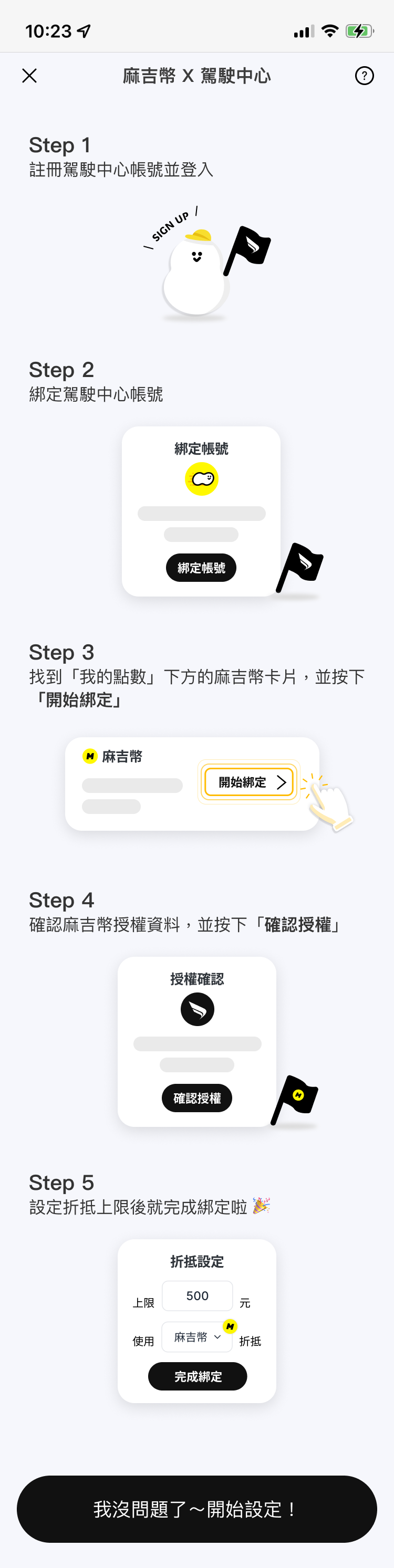 3. 登入/ 註冊駕駛中心,請確認展開的必要內容後,點擊 綁定帳號」。
 4. 登入駕駛中心後,選擇麻吉幣開始綁定並確認授權。
 5. 選擇折抵點數並設定折抵上限,即可完成麻吉幣綁定。
 6. 恭喜完成!可以開始折抵麻吉幣囉!
 \*此為一次性授權,同意過後兩邊點數將同步。
***
## 消費紀錄
* 若您想了解怎麼查看消費紀錄,請參考:[如何查看我的消費紀錄?](https://help.carmochi.com/account/credit-card/payment-invoice)
若您扣款當下,或是在核對結帳單時,不清楚該筆扣款是什麼項目,可按照以下方式區分。
* 若扣款項目顯示 **Autopass-Pa**:停車訂單的扣款
\*此為一次性授權,同意過後兩邊點數將同步。
***
## 消費紀錄
* 若您想了解怎麼查看消費紀錄,請參考:[如何查看我的消費紀錄?](https://help.carmochi.com/account/credit-card/payment-invoice)
若您扣款當下,或是在核對結帳單時,不清楚該筆扣款是什麼項目,可按照以下方式區分。
* 若扣款項目顯示 **Autopass-Pa**:停車訂單的扣款
 * 若扣款項目顯示 **Autopass-St**:路邊停車訂單的扣款
